🔐 Two-factor authentication (2FA) adds a second factor on top of the password: the user proves their identity with a code generated by an authenticator app, sent by e-mail, or sent by SMS. The policy is set on the company record, per audience.
Where to configure it
Administration > Tables > Company > 2FA policy tab.
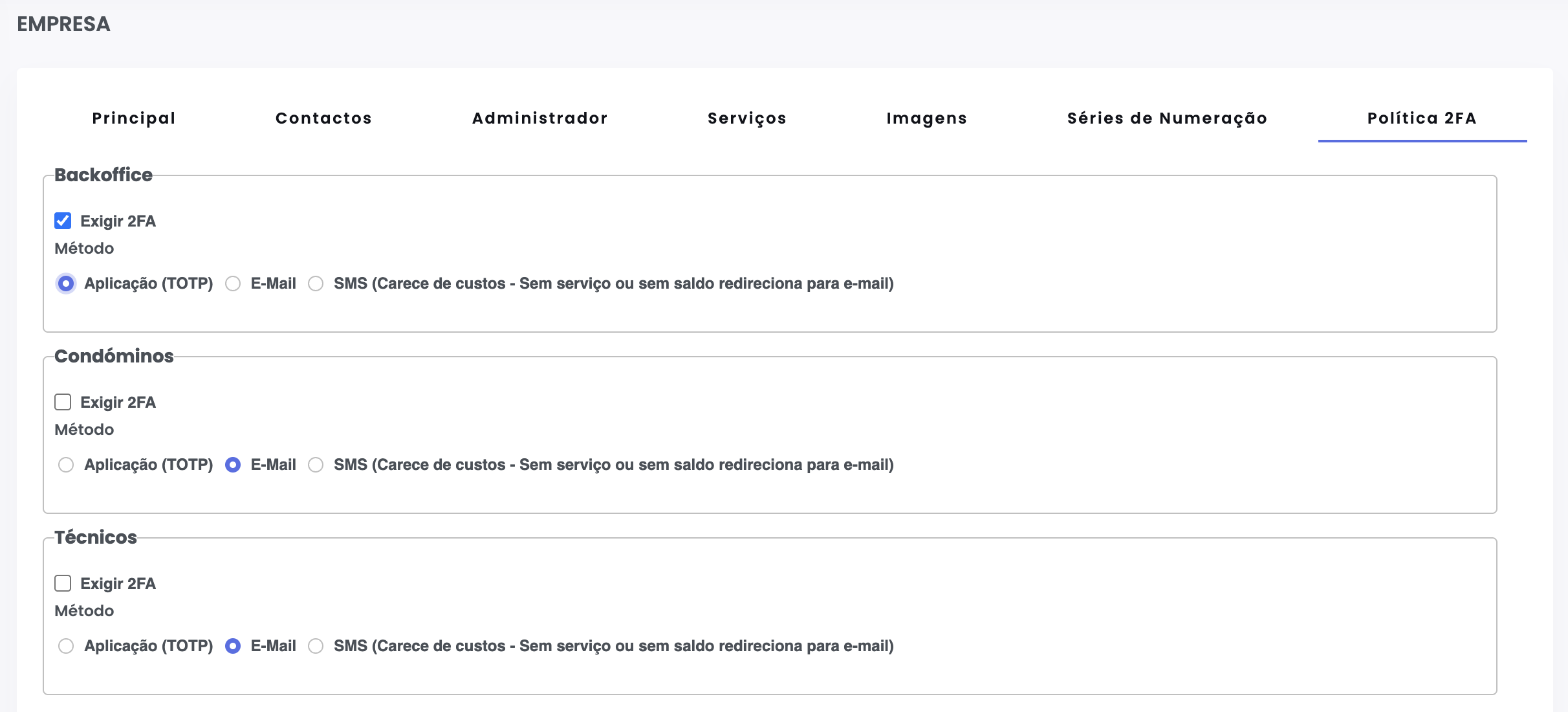
You’ll find three sections, one per audience that can sign in to the GC products:
- Backoffice — internal users signing in to GC (and the AddIn).
- Clients — users of the Client Portal.
- Technicians — users of the Technician Portal.
Each section has two independent controls:
- Require 2FA — turns the gate on or off for that audience. If off, sign-in works as before.
- Method — which second factor to use:
- App (TOTP) — 6-digit code generated every 30 seconds by an app such as Google Authenticator, Authy or Microsoft Authenticator. Doesn’t consume SMS and doesn’t depend on e-mail availability.
- E-Mail — code sent to the user’s e-mail address (
E-Mailin the backoffice,Correspondence E-Mailon the portals). - SMS — code sent by SMS to the correspondence number. Has a cost: with no service or no SMS credit, the system automatically falls back to e-mail.
How the gate is evaluated on each sign-in
The gate fires when both flags are on:
- On the company record, Require 2FA is ticked for that audience.
- On the user record (Access tab), the Two-Step Authentication check is ticked (on by default).
The check on the user is a per-user override: an admin can untick it to exempt a specific user — useful for lost devices or while the user doesn’t yet have an authenticator app.
Reset 2FA for a user
When the method is TOTP and the user lost their device or needs to re-pair, open the user (or client / technician) record and use the Reset 2FA button. It clears the pairing and trusted devices; on the next sign-in the user scans the QR code again.
Home Edition
In the Home Edition, only the App (TOTP) method is available for the backoffice. The portals (Clients and Technicians) don’t exist in this tier, so those sections aren’t shown.
Available for the following software:
✅ GC Software
✅ Client Portal
✅ Technician Portal
✅ AddIn (backoffice users)