📄 Start a building without keying everything in
When you take over a building, the previous manager hands you a statement of owner debts — often in a format that is not the GC’s.
Artificial Intelligence reads that file and fills in the grids for you, sparing you the manual entry unit by unit.
🔍 Where to find it
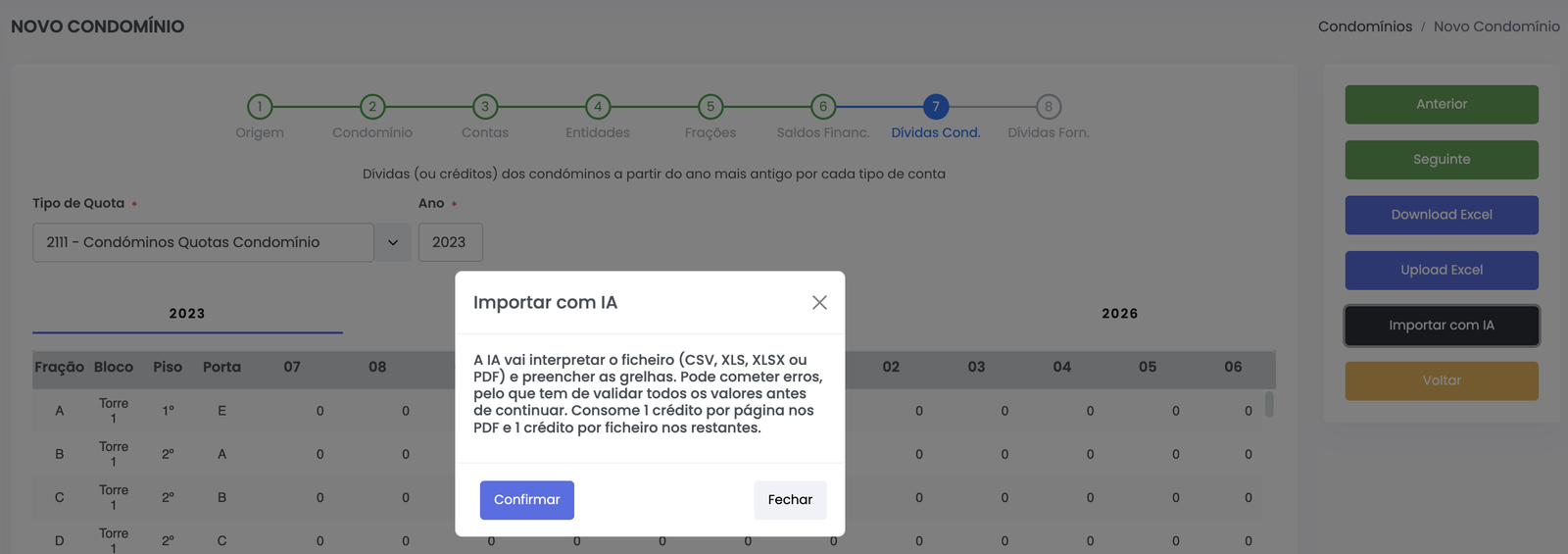
In the new-building wizard, on the Owner debts step, click Import with AI.
⚙️ How to use it
- Select the fee type and the year the file refers to
- Click Import with AI
- Confirm the message and choose the file
- Wait while the AI reads the document
- Check the grids and correct whatever is needed
- Move on to the next step
📎 Accepted formats
- Excel (XLS, XLSX)
- CSV
- PDF, including reports exported from other programs
The file does not have to follow a GC template. The AI interprets whatever structure it finds.
💡 What the AI does for you
- Identifies the units and matches them to the building’s
- Spreads the figures across the year and month they belong to
- Recognises condominium fees, reserve fund and extraordinary fees
- Fills in the grids for every year present in the file
⚠️ Important notes
- Always check the figures before moving on. The AI can misread, especially in documents with unusual structures
- Costs 1 credit per page for PDF files and 1 credit per file for the others
- If you do not have enough credits for every page, the import is not performed and nothing is consumed
- The feature must be enabled under
Administration >> AI >> Features
✅ Next step
Explore other AI features as well:
- How to explain a report with AI
- How to query the GC from an AI assistant
- How to generate budget suggestions